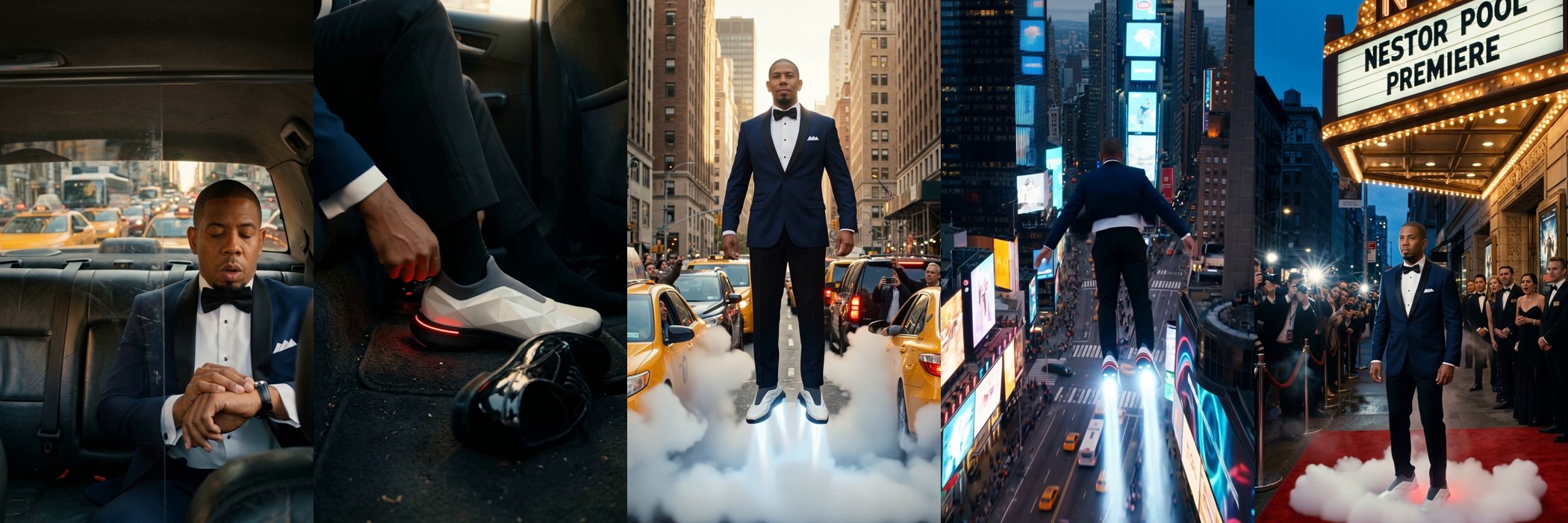
Late to My Own Premiere
Thanks for watching! Here's exactly how I made my flying-shoes short film: my real face locked in with Nano Banana Pro, 12 frames animated with Kling 4.0 on Higgsfield, my cloned voice + SFX + music on ElevenLabs, edited in DaVinci Resolve. Inspired by @visualateli 🙌
- Tool
- Kling 4.0 · Higgsfield
- Format
- 9:16 · 32s
- Keyword
- PROMPT
Lock your face: build a character sheet
Open Gemini → Create image → Nano Banana Pro, 16:9. Upload 5–7 real photos of yourself (2 full body + face close-ups: front, 3/4 and profile). Real photos are what keep your face consistent in every frame.
Prompt:
These photos are all the same real person: me. Generate a professional CHARACTER REFERENCE SHEET of me in one wide 16:9 image on a seamless light-gray studio background. Keep my exact real face, identity, skin tone, head shape, ears and body proportions with maximum fidelity, no beautifying, no slimming, no exaggeration. Key identity details: [your hair, eyebrows, eyes, facial hair, skin tone, build]. Top row: 3 face close-ups (front, 3/4, side profile), calm confident expression. Bottom row: 4 full-body shots (front, 3/4, side profile, back), standing naturally. Outfit identical in every view: navy blue shawl-lapel tuxedo jacket with black satin lapels, one button, white tuxedo shirt with black studs, black bow tie, white folded pocket square, black tuxedo trousers, black patent leather shoes. Photorealistic photographs shot on a full-frame camera, 85mm lens, soft even high-key studio light, sharp detail. Not 3D, not illustration. No text, no labels, no watermarks.
Design the flying shoes
Same Gemini chat, so it keeps the style. One product sheet you'll attach to every frame:
Now create a PRODUCT REFERENCE SHEET for a fictional futuristic flying shoe, in one wide 16:9 image on a seamless light-gray studio background. The shoe: a sleek low-top luxury sneaker with a sculpted, faceted angular upper in glossy pearl-white panels (like a futuristic car body), a dark titanium-gray knit sock collar, a thick matte-black sole, a thin glowing red LED light strip running along the heel and outsole edge, and a small black circular badge on the outer side with a chrome emblem. On the bottom of the sole: two round chrome jet-thruster nozzles (under the forefoot and the heel) with a subtle blue-white inner glow. Views: pair from the front 3/4 angle, single shoe side profile, back view showing the red LED heel strip, and bottom view showing the thruster nozzles. Photorealistic premium product photography, soft studio light, crisp reflections, sharp detail. No other text, no labels, no watermarks.
Generate your 12 frames
In Gemini, Create image → Nano Banana Pro, 9:16. For EVERY frame attach your real face photos + the character sheet + the shoe sheet, and edit one image at a time. End every prompt with: "the exact man from my character sheet, navy shawl-lapel tuxedo, wearing the white flying shoes from my product sheet. Photorealistic cinematic film still, ARRI Alexa anamorphic, [light], film grain. No text, no watermarks."
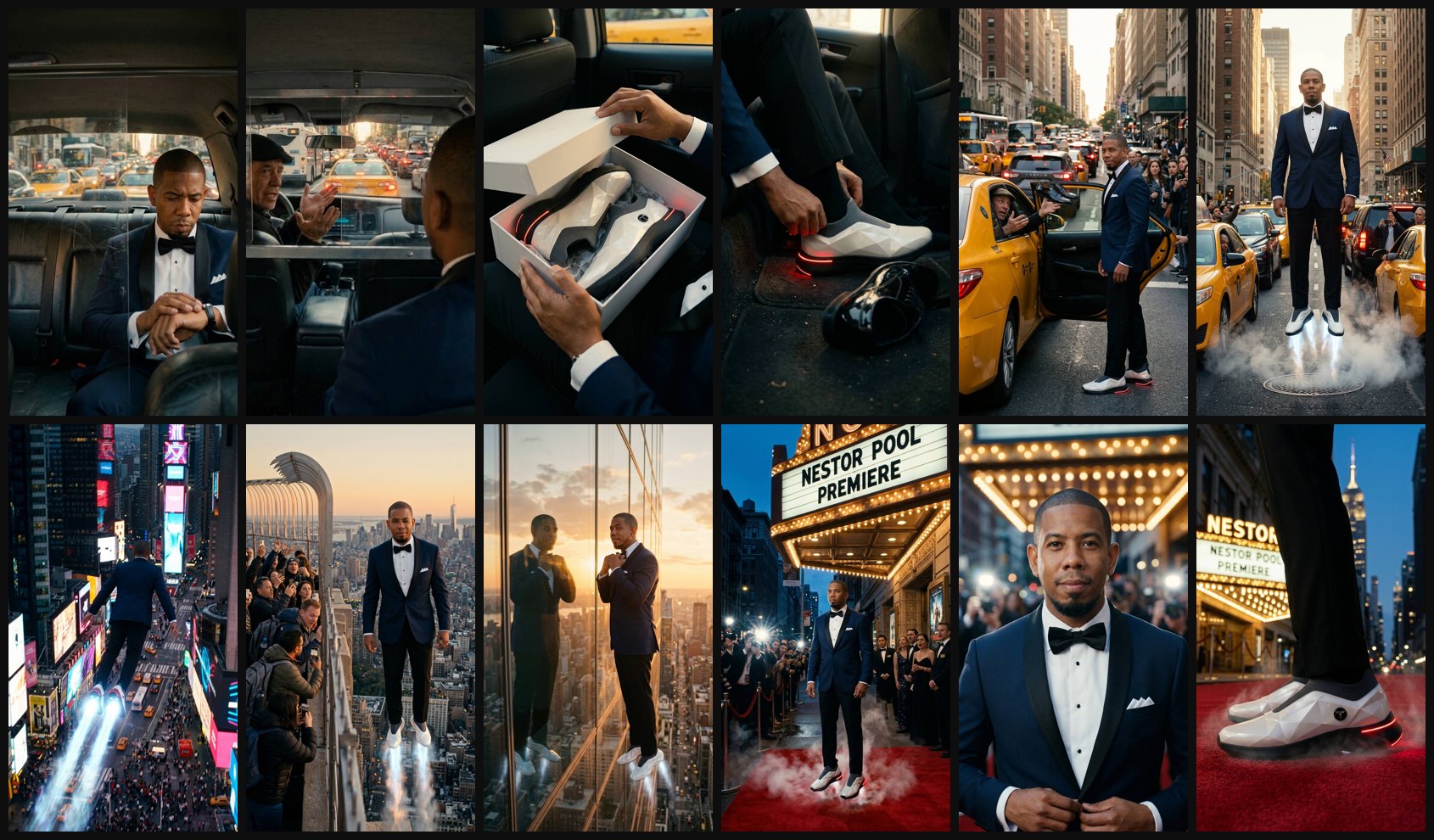
My 12 frames (NYC, golden hour into blue hour):
1. Back seat of a yellow cab stuck in Fifth Avenue traffic, he checks his watch, stressed.
2. Over-the-shoulder from behind him: the cab driver turns and shrugs, palms up.
3. Top-down: he opens a matte white box on his lap, the shoes glow red.
4. Macro on the cab floor: he slides into the shoes, the red LED strip lights up, patent leather shoes beside them.
5. Street level: out of the cab, he tosses his old shoes to the driver.
6. Low angle: liftoff between the cabs, blue-white thrusters, manhole steam, people filming.
7. Drone follow shot from behind and above, flying over Times Square (generic billboards).
8. Empire State observation deck: tourists filming as he hovers at their height.
9. Floating next to a mirrored skyscraper, fixing his bow tie in the reflection.
10. Landing on a red carpet under a marquee with your name + "PREMIERE", camera flashes.
11. Medium close-up buttoning his jacket, half smile to camera, flash bokeh.
12. Low macro of the shoes on the red carpet, LED pulsing, city blurred behind.
Animate every frame with Kling 4.0
In Higgsfield → Video → Kling 4.0 → Image to Video, 1080p, 5 seconds, 9:16. Upload each frame as the start image. For shots that must connect (my 11 → 12: face to camera, then tilt down to the shoes) use frame 11 as Start and frame 12 as End.
One prompt per shot. My exact prompts:
1. The man in the tuxedo glances at his wristwatch, exhales impatiently and looks up toward the stalled traffic; outside the rear window the yellow cabs barely creep forward and brake lights flicker. Slow push-in.
2. The taxi driver turns back toward the passenger and talks, shrugging with both palms up and shaking his head; the passenger in the foreground listens. Traffic ahead stays stuck. Static camera with a subtle car idle vibration.
3. His hands lift the lid off the white box and set it aside, revealing the futuristic white faceted shoes inside; their red LED strips pulse softly. Slow tilt down toward the shoes.
4. He pulls the white shoe fully onto his foot and taps the heel; the red LED heel strip powers on with a bright pulse along the sole edge. Macro shot, static camera.
5. With a cocky half smile he tosses the black patent leather shoes through the open front window into the cab; the surprised driver catches them. He steps into the street; pedestrians react and film.
7. He flies fast forward over Times Square, tuxedo jacket fluttering, two bright thruster trails behind his feet; billboards, cabs and crowds rush below. Fast drone follow shot.
8. He hovers in the open air just beyond the observation deck railing, smiles and winks at the tourists. Then the camera smoothly pulls back in a wide zoom-out as he blasts away into the open sky above Manhattan. He stays in the air the whole time, never touches or crosses the railing.
9. Hovering next to the mirrored skyscraper glass at sunset, he calmly straightens his bow tie while watching his reflection, then gives a slight confident smirk. Slow orbit.
10. He settles down onto the red carpet as the thruster vapor bursts outward and clears; paparazzi flashes fire, the guests gasp and clap. Static wide shot.
11 → 12. He buttons his tuxedo jacket and gives a confident half smile to camera, then the camera tilts down in one smooth continuous move to his white glowing shoes on the red carpet. No cuts.
Add to every prompt: "Keep his exact face and outfit. Photorealistic cinematic, natural motion." Shot 6 (the liftoff) is the prompt below 👇
The liftoff prompt (shot 6)
The jet thrusters under his white shoes roar with bright blue-white flames and thick vapor; he rises fast from the street and shoots straight up out of the top of the frame; steam from the manhole swirls, drivers and pedestrians stare up. Camera tilts up following him. Keep his exact face and outfit. Photorealistic cinematic, energetic motion from the first frame.
Voice, sound and music with ElevenLabs
Kling 4.0 also gives you native sound effects in each clip. Keep them low as a base layer, then add on ElevenLabs:
Voice: I cloned my own voice (Professional Voice Clone) from a clean 30-minute recording on a lav mic. My lines: "Good thing I came prepared." and "Right on time." The cab driver is a designed voice: "a gruff, raspy man in his late 50s with a thick Brooklyn accent, a veteran yellow cab driver".
Sound effects (Text to Sound Effects): Manhattan traffic with honking from inside a cab · luxury wristwatch ticking · shoebox lid and tissue paper · futuristic sneaker power-up with a digital chime · rocket-boots ignition and liftoff roar · fast fly-by whoosh · tourists gasping "oh my god" · heavy superhero landing on a red carpet · paparazzi camera flashes and cheering · deep cinematic trailer boom.
Music (Eleven Music, instrumental): "Original hard rock superhero anthem, 120 BPM in E minor. Tense palm-muted guitar with ticking hi-hat, riser and drum fill, then an explosive drop into a big driving distorted riff with heavy drums and orchestral brass stabs, triumphant and cocky. No vocals."
Cut it to the beat
I edited in DaVinci Resolve, vertical 1080×1920, 24 fps, ~32 seconds:
- Keep each shot 2–3 seconds. Speed up the flying shots a little (Times Square at 130%).
- Line the music so the drop hits the exact frame he blasts off, and the landing hits a downbeat.
- Duck the music and SFX under every line so the voice sits on top.
- End on the shoes with your disclaimer, plus the "Comment PROMPT" call to action.
- Mix around -14 LUFS for Reels and TikTok.